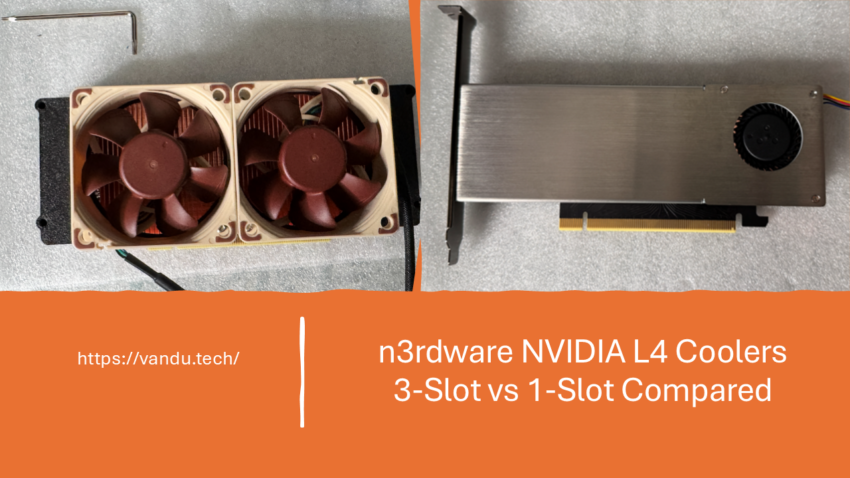
As part of my collaboration with Robbe from n3rdware, he designed two different aftermarket coolers for the NVIDIA L4: a 3-slot version and a 1-slot version. I tested each one on a separate ESXi host running the same stress test. This article brings both results together in a direct comparison so you can see how the two designs stack up.
My NVIDIA L4 Now Runs 18°C Cooler with a Custom 3 Slot Cooler
NVIDIA L4 Cooling Results with a Custom 1 Slot Cooler from n3rdware
Background
The NVIDIA L4 is a passively cooled data center GPU. It relies entirely on chassis airflow to stay cool, which works fine in high-airflow server enclosures but falls short in workstation-class systems and homelabs. Both of my ESXi hosts were previously cooled with DIY solutions: 3D-printed fan mounts with manually controlled fans. Robbe from n3rdware has been designing custom GPU coolers for years, primarily for the homelab community, and together we set out to find a better solution.
One of the things that makes the L4 particularly interesting for a homelab is its support for NVIDIA vGPU. With vGPU, a single physical GPU can be shared across multiple virtual machines simultaneously. The hypervisor (in my case VMware vSphere) slices the GPU’s resources into virtual profiles, each with a dedicated portion of the GPU’s VRAM, and assigns them to individual VMs. Each VM sees what looks like its own dedicated graphics card, even though they are all running on the same physical L4.
This is a very powerful capability. Instead of needing a separate GPU for each VM that requires graphics acceleration, AI inference, or compute workloads, a single L4 can serve multiple VMs at the same time. In my setup, I use the L4-24Q profile which gives a single VM the full 24 GB of VRAM, but smaller profiles exist that allow you to split the GPU across 2, 4, 8, or even more VMs. For a homelab running multiple desktops, remote workstations, or inference workloads in parallel, this makes the L4 incredibly versatile and cost-effective. It also means the GPU runs under real, sustained load more often, which is exactly why proper cooling matters so much.
The result was two cooler designs, each tested on its own host with identical methodology.
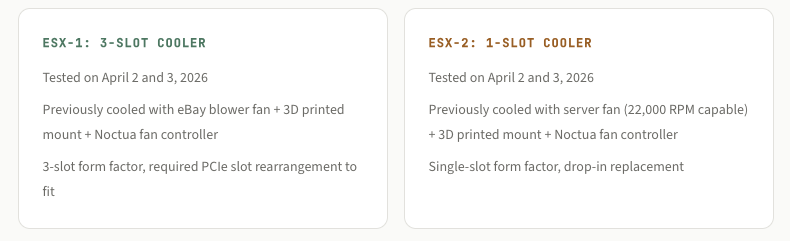
Both tests used Geeks3D FurMark 2.10.2 running inside a Windows VM with a vGPU profile L4-24Q on VMware vSphere 8 Update 3, at 3840×2160 (4K UHD). Telemetry was captured via nvidia-smi at 1-second intervals.
The numbers side by side
Temperature under load
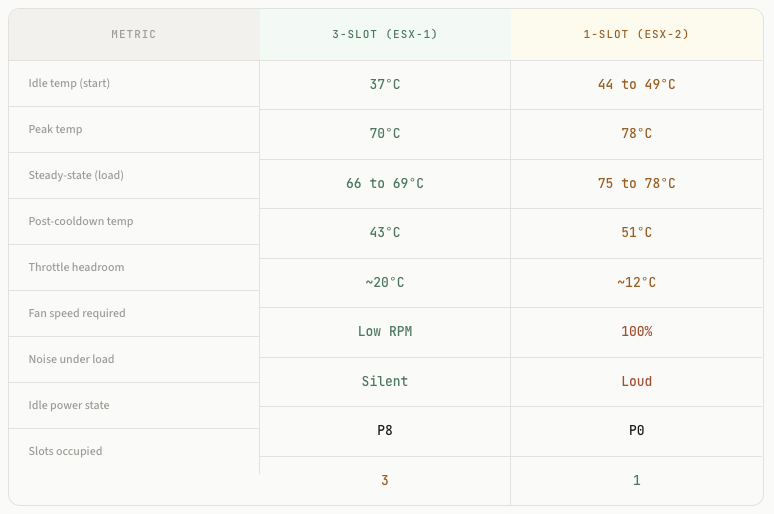
The thermal difference between the two coolers is significant. The 3-slot cooler on ESX-1 held the L4 at 66 to 69°C under sustained FurMark load and peaked at just 70°C. The single-slot cooler on ESX-2 plateaued at 75 to 78°C with a peak of 78°C. That is roughly 8 to 10°C warmer under the same workload.
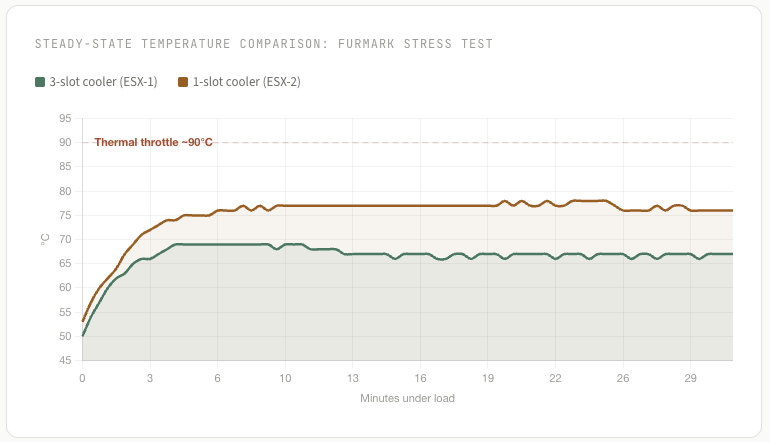
Both coolers keep the L4 below the ~90°C thermal throttle threshold, but the margin is very different. The 3-slot cooler has roughly 20°C of headroom, meaning it can handle warmer ambient conditions, adjacent hot components, or even heavier workloads without concern. The single-slot cooler has about 12°C of headroom, which is tighter and leaves less room for variables.
Noise
This is where the two coolers diverge most sharply. The 3-slot cooler runs its fan at low RPM and is effectively silent. I cannot hear it during normal operation or even under sustained load. This was the primary goal of the entire project, and the 3-slot design delivers on it completely.
The single-slot cooler is a different story. It requires the fan at 100% speed to maintain temperatures in the upper 70s. At full RPM, it is clearly audible and, for my environment, too noisy. According to Robbe, this is by design: the smaller cooler really needs the fan at 100% during load, and temperatures of 80+ degrees are to be expected. It is within spec, but it is not quiet.
Form factor and installation
The single-slot cooler wins on compatibility. It fits in the same space as the L4’s original passive heatsink, with no clearance issues. It is a true drop-in replacement that does not interfere with adjacent PCIe cards or motherboard components.
The 3-slot cooler is bulkier and requires more planning. On ESX-1, I had to swap my 100 Gig NIC with the GPU because a motherboard heatsink was blocking the space. The cooler also occupied adjacent PCIe slots. According to Robbe, the 3-slot cooler is designed to be used with a riser cable, which would avoid these clearance issues. I installed mine directly, which worked but required creative slot rearrangement.
Cooldown recovery
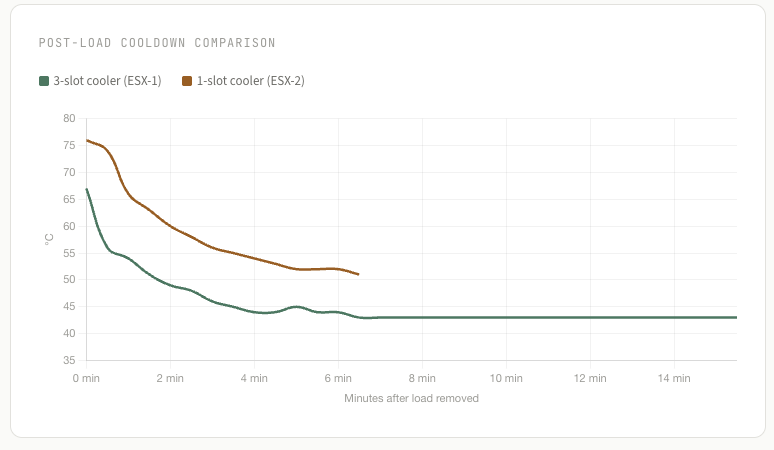
After load was removed, the 3-slot cooler dropped the GPU from 67°C to 43°C in about 14 minutes, settling just 6°C above the cold-start baseline. The single-slot cooler brought the GPU from 76°C to 51°C in roughly 6 minutes. Both show clean exponential decay curves, but the 3-slot cooler reaches a significantly lower idle temperature.
Power state behavior
An interesting difference: the L4 on ESX-1 with the 3-slot cooler properly enters P8 at idle, drawing only 18 W. The L4 on ESX-2 with the single-slot cooler stayed in P0 at idle, drawing around 25 W. This could be related to the higher idle temperatures or other system-level factors, but it is worth noting that the cooler-running GPU also idles more efficiently.
Different hosts, different variables: ESX-1 and ESX-2 are separate machines with their own cases, airflow, and component layouts. The temperature differences between the two coolers are significant, but some portion of that gap could be attributed to chassis differences rather than the coolers alone. Keep this in mind when interpreting the results.
My conclusion
For me, the 3-slot cooler is the clear winner. It runs cooler, quieter, and allows the GPU to idle more efficiently. The noise reduction alone made this entire project worthwhile. I plan to replace the single-slot cooler on ESX-2 with a second 3-slot unit so that both hosts meet the same standard.
That said, the single-slot cooler is not a bad product. It does what it is designed to do: keep the L4 within operating limits in a compact single-slot form factor. If noise is not a concern and you need the PCIe slot compatibility, it is a functional solution. But if you have the physical space for the 3-slot version and you care about noise and temperatures, the larger cooler is the better choice by a wide margin.
Which cooler should you pick?
Choose the 3-slot cooler if: you want the lowest temperatures, silent operation, and you have the physical space (or a riser cable) to accommodate a 3-slot card. This is the cooler that delivered on the original goal of the project.
Choose the 1-slot cooler if: you need a compact drop-in replacement and can tolerate fan noise under load. It keeps the L4 within spec, but it runs the fan at 100% and temperatures will sit in the upper 70s.
For the full details on each test, see the individual articles for the 3-slot cooler on ESX-1 and the 1-slot cooler on ESX-2.
My NVIDIA L4 Now Runs 18°C Cooler with a Custom 3 Slot Cooler
NVIDIA L4 Cooling Results with a Custom 1 Slot Cooler from n3rdware