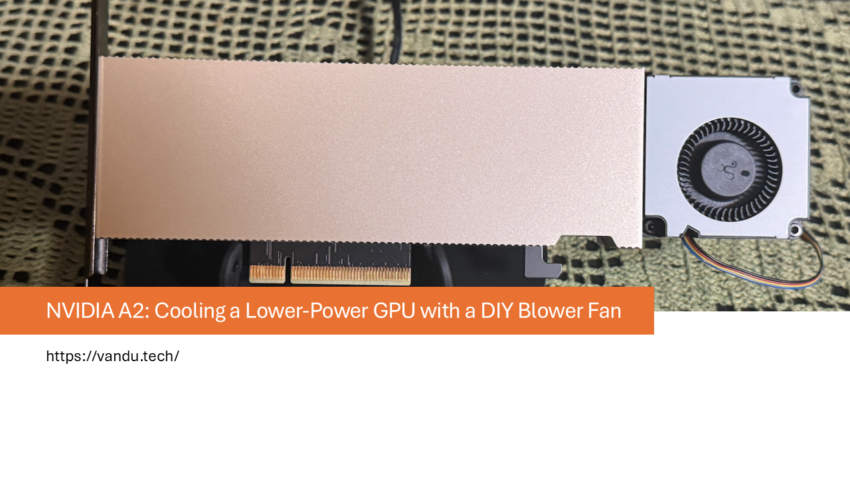
My third ESXi host, ESX-3, runs an NVIDIA A2 instead of the L4 found in ESX-1 and ESX-2. The A2 is a lower-power data center GPU with a 60 W TDP compared to the L4’s 72 W. Like the L4, it is passively cooled and supports NVIDIA vGPU. I am cooling it with the same type of DIY blower fan with a 3D printed mount that I used on ESX-1 before installing the n3rdware cooler. There is no custom cooler on this host.
The NVIDIA A2
The NVIDIA A2 is a compact, lower-power data center GPU based on the Ampere architecture. It comes with 16 GB of GDDR6 VRAM and a TDP of around 60 W, making it significantly more power-efficient than the L4’s 72 W. Like the L4, it ships as a passively cooled single-slot card designed for high-airflow server chassis.
One thing that makes the A2 special is its PCIe x8 interface. While the L4 uses a full x16 slot, the A2 only needs an x8 slot. This is a real advantage in homelab and edge environments where motherboards may have limited PCIe slots or where x16 slots are already occupied by other hardware. The A2 fits in more places and in more configurations than the L4 can.
Like the L4, the A2 supports NVIDIA vGPU. This is one of the most compelling features of these data center GPUs. With vGPU, a single physical GPU can be shared across multiple virtual machines at the same time. The hypervisor (in my case VMware vSphere) divides the GPU’s resources into virtual profiles, each with a dedicated portion of VRAM, and assigns them to individual VMs. Each VM sees what looks like its own dedicated graphics card, even though they are all running on the same physical A2.
This means you do not need a separate GPU for every VM that requires graphics acceleration, AI inference, or compute workloads. A single A2 can serve multiple VMs simultaneously using smaller vGPU profiles, or you can assign the full GPU to one VM using the maximum profile. For a homelab running multiple remote desktops, lightweight inference tasks, or development environments in parallel, this makes the A2 an incredibly versatile and cost-effective card. Combined with its low power draw and compact x8 form factor, it is an easy GPU to justify in a homelab build.
The lower power consumption also means less heat to dissipate, which in theory makes cooling easier. This test was meant to see how the A2 handles sustained load with nothing more than a budget blower fan from eBay.
Cooling setup
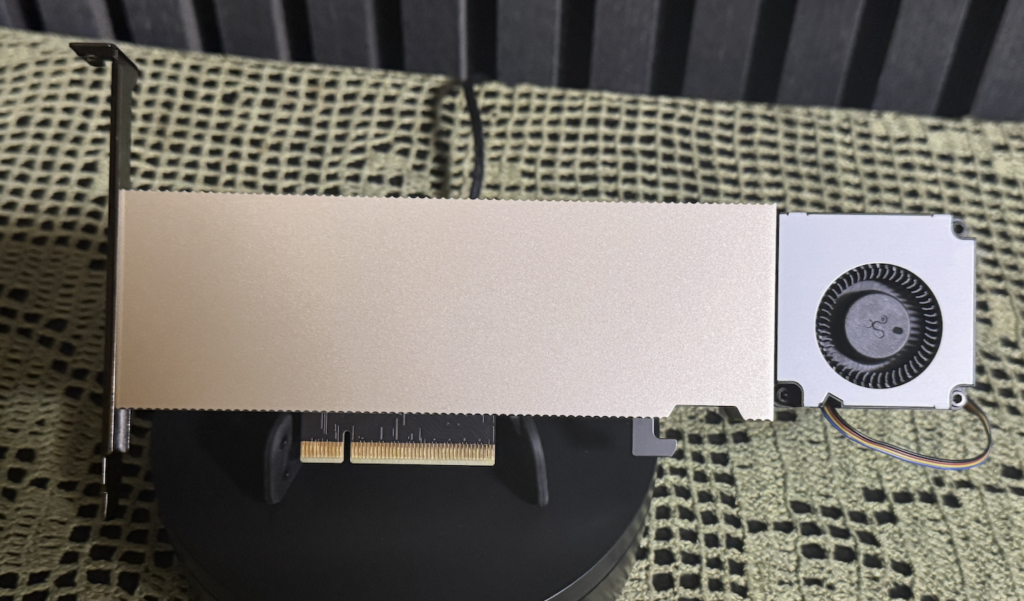
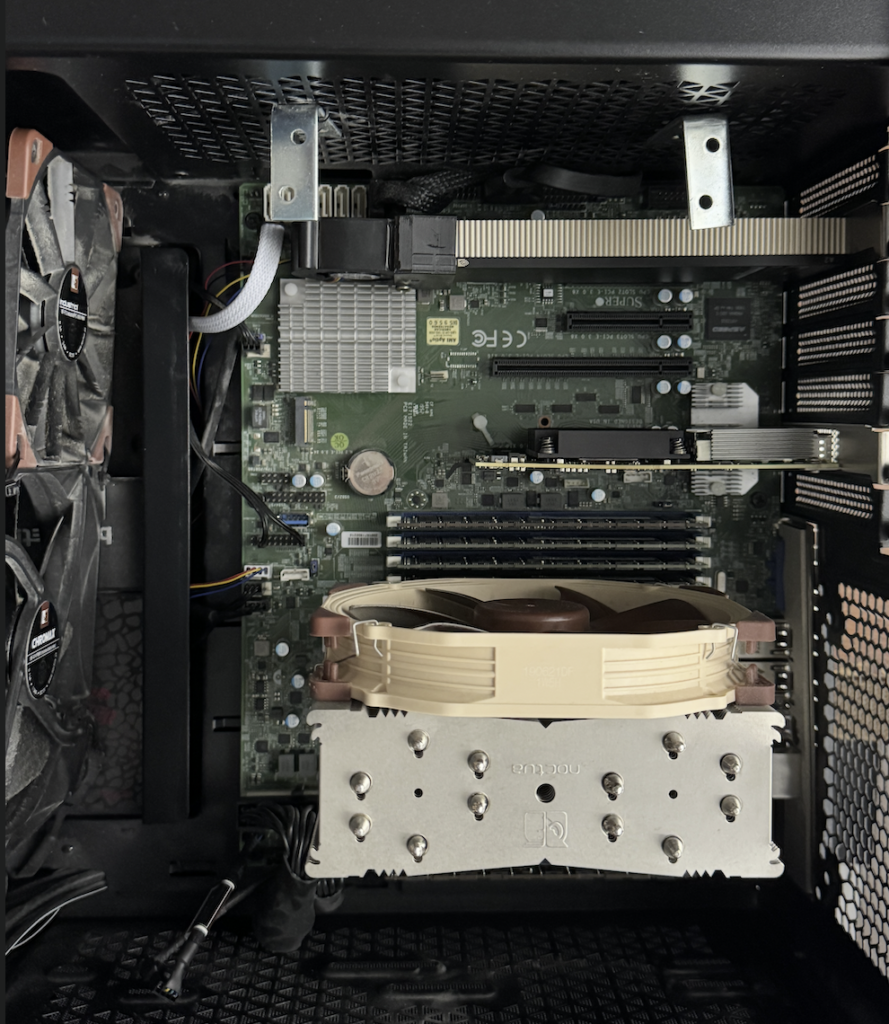
The cooling on ESX-3 is simple: a blower fan with a 3D printed mounting bracket, purchased off eBay for around 20 to 30 dollars. This is the same type of DIY solution I was using on ESX-1 before switching to the n3rdware 3-slot cooler. There is no custom cooler, no Noctua fan controller, nothing fancy. Just a blower fan pointed at the GPU’s heatsink.
Test setup
Same methodology as my other tests. I ran Geeks3D FurMark 2.10.2 inside a Windows VM configured with a vGPU profile A2-16Q, which is the maximum profile for the A2, giving the VM the full 16 GB of VRAM. The hypervisor is VMware vSphere 8 Update 3. FurMark was set to FurMark (GL) at 3840×2160 (4K UHD) with Fullscreen, Display OSI, and Benchmark enabled. Telemetry was captured at 1-second intervals via nvidia-smi.
Results at a glance
Full telemetry
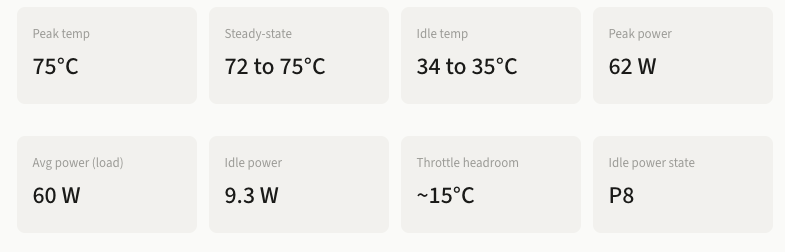
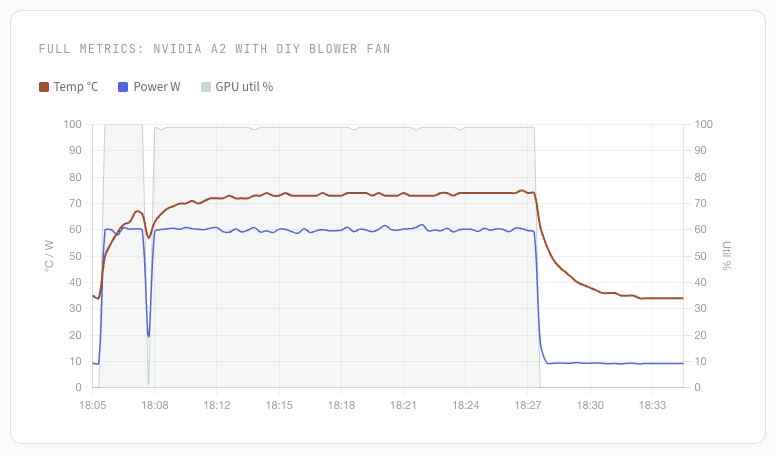
The A2 started at a cool 35°C in P8 power state, drawing just 9.3 W at idle. Once FurMark kicked in at 99 to 100% utilization, the GPU climbed steadily to a plateau of 72 to 75°C over roughly 5 to 6 minutes. Power draw stabilized at around 60 W, well below the L4’s 72 W under similar load. The GPU held steady in this range for the full duration of the ~19 minute stress test.
After load was removed, the A2 dropped back to 34°C within about 7 minutes, returning completely to its cold-start baseline. The GPU also correctly re-entered P8 idle state, drawing just 9.2 W. This is a clean, full recovery with no residual heat buildup in the chassis.
Temperature curve
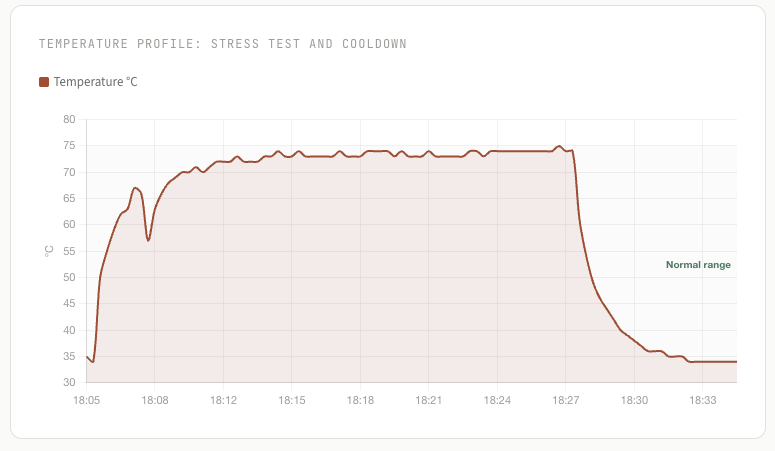
The temperature curve shows a smooth ramp from 35°C to the 72 to 75°C plateau, with no sudden spikes or instability. There is a brief dip around the 2-minute mark where utilization dropped momentarily before the main stress phase began. Once at steady state, temperatures oscillated gently between 72 and 75°C for the remainder of the test.
Clean idle behavior: The A2 properly enters P8 power state at idle, drawing only 9.3 W. After the stress test, it returned to its original 34°C baseline and re-entered P8. This is exactly how it should behave.
How does this compare to the L4?
It is important to understand that the A2 and the L4 are fundamentally different GPUs. The A2 is based on the Ampere architecture (8 nm process) with 1,280 CUDA cores, 40 third-generation Tensor Cores, 16 GB of GDDR6 on a 128-bit bus delivering 200 GB/s of bandwidth, and a configurable TDP of 40 to 60 W over a PCIe Gen4 x8 interface. The L4 is based on the newer Ada Lovelace architecture (5 nm process) with 7,424 CUDA cores, 232 fourth-generation Tensor Cores with FP8 support, 24 GB of GDDR6 on a 192-bit bus delivering 300 GB/s of bandwidth, and a 72 W TDP over a PCIe Gen4 x16 interface.
The L4 has nearly 6 times more CUDA cores, 50% more VRAM, 50% more memory bandwidth, a newer and more efficient architecture, and native FP8 support that the A2 does not have. To put the performance gap in consumer GPU terms: the L4 performs slightly above an RTX 5060 Ti, with an RTX 3080 being only about 9% more powerful. The A2, on the other hand, is built on the same GA107 chip as the RTX 3050 but sits closer to a GTX 1050 Ti in performance. An RTX 3050 is already twice as powerful as the A2, and the RTX 5060 Ti is roughly 5.4 times more powerful. Despite the L4 only drawing 12 W more than the A2 at maximum load, the performance per watt is in a completely different league.
On the thermal side, the A2 is noticeably easier to cool, but this is not simply because of 12 W less power draw. The architecture, the number of processing units, the VRAM configuration, and the memory bus width are all fundamentally different. The A2 generates less heat by design. For context, the DIY blower fan on ESX-1 with an L4 reached 88°C and was on the edge of thermal throttling. The same type of blower fan on ESX-3 with the A2 stays at 72 to 75°C with about 15°C of headroom.
The A2 also idles much more efficiently at 9.3 W versus the L4’s 18 W in P8. For a homelab running 24/7, that lower idle draw adds up.
Different hosts, different variables: ESX-3 is a separate machine from ESX-1 and ESX-2, with its own case, airflow, and ambient conditions. Direct comparisons with the L4 results should account for these differences.
Is a custom cooler needed?
Based on these results, the A2 does not need a custom cooler in my setup. The cheap eBay blower fan with a 3D printed mount keeps the GPU at comfortable temperatures with solid headroom. The A2’s lower power draw means less heat to manage, and the blower fan handles it without breaking a sweat.
The blower fan on ESX-3 is actually silent. Because the A2 generates so much less heat than the L4, the fan does not need to run at max RPM. It stays at a low enough speed that I cannot hear it during normal operation. This is a big contrast to the L4, where the same type of blower fan had to work much harder and was clearly audible. With the A2’s lower thermal output, a cheap blower fan is genuinely all you need.
The verdict
The NVIDIA A2 on ESX-3 runs comfortably at 72 to 75°C under sustained full load with nothing more than a budget blower fan from eBay. It peaks at 75°C, maintains roughly 15°C of headroom before thermal throttling, and returns cleanly to its 34°C idle baseline after load is removed.
The A2’s lower 60 W power draw makes it significantly easier to cool than the L4. A simple DIY blower fan is enough to keep it within safe operating limits. For now, no custom cooler is needed on this host.
My NVIDIA L4 Now Runs 18°C Cooler with a Custom 3 Slot Cooler
NVIDIA L4 Cooling Results with a Custom 1 Slot Cooler from n3rdware
n3rdware NVIDIA L4 Coolers: 3-Slot vs 1-Slot Compared