Short description
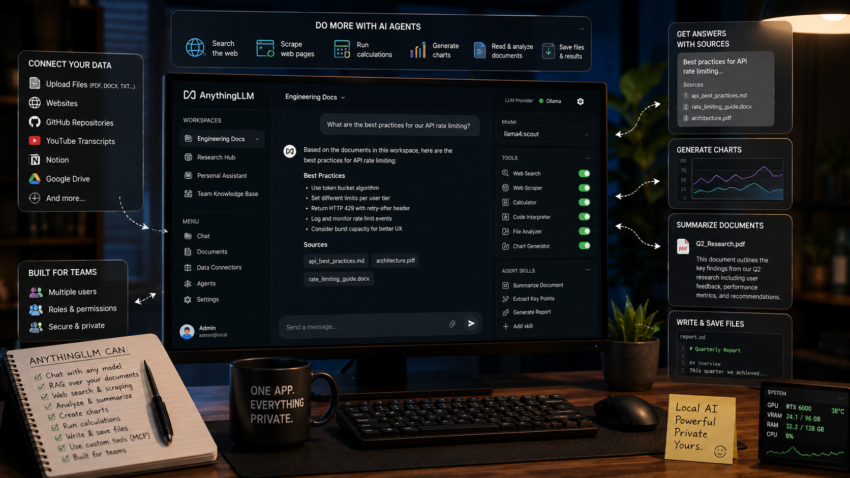
AnythingLLM is a full local AI application, not just a chat box. In one tool it gives you chat with your models, document RAG, and AI agents that can take actions, and it can serve a whole team rather than a single person.
Purpose and how people use it
People reach for AnythingLLM when they want one private application that does most things, instead of a separate tool for each job. It connects to many model providers, local ones like Ollama and cloud ones too, so you are never locked in, and you organize everything into workspaces where each workspace keeps its own documents and settings.
What makes it powerful is everything it adds on top of plain chat:
- RAG over your own material. Upload PDFs, Word files, text, and more, or pull in whole websites, GitHub repositories, YouTube transcripts, and other sources through its data connectors, then ask questions and get answers with sources.
- AI agents that take actions. In agent mode it can search the web, scrape a page, run calculations, generate charts, read and summarize your documents, and save files, all from a chat command rather than you doing it by hand.
- Tools and skills. You can extend the agents with custom agent skills and connect external tools through MCP servers, so the agent can reach beyond AnythingLLM itself.
- Built for more than one person. The Docker version supports multiple users with roles and permissions, so a household or a team can share one instance.
- Ways to plug it in. You can embed a chat widget on your own website and use the developer API to wire AnythingLLM into other apps.
So it sits somewhere between a chat front end, a RAG tool, and an agent platform, all in one private install.
Prerequisites
- Docker installed. Docker Desktop with WSL2 on Windows is fine.
- Ollama running and reachable. See the Ollama guide.
Quick setup
Create a folder and a compose file. AnythingLLM serves on port 3001, which is free in this stack.
mkdir -p ~/anythingllm && cd ~/anythingllm

cat > docker-compose.yml << 'YAML'
services:
  anythingllm:
    image: mintplexlabs/anythingllm:latest
    container_name: anythingllm
    restart: unless-stopped
    cap_add:
      - SYS_ADMIN
    ports:
      - "3001:3001"
    environment:
      - STORAGE_DIR=/app/server/storage
    volumes:
      - anythingllm_storage:/app/server/storage

volumes:
  anythingllm_storage:
YAML

docker compose up -d
Open http://localhost:3001. On first launch it walks you through a short setup where you choose your model provider and create your first workspace.
Connect your local models
During onboarding, or later in Settings:
- Set the LLM provider to Ollama.
- Set the Ollama Base URL to
http://host.docker.internal:11434. - Pick one of your chat models, for example llama4:scout.
For RAG, AnythingLLM also needs an embedding model. It ships with a built in embedder that works out of the box, so you can leave it alone to start, or switch the embedder to Ollama and choose bge-m3 if you prefer your own.
The one thing that trips everyone up
Like every container in this stack, AnythingLLM cannot reach Ollama at localhost. Use http://host.docker.internal:11434 as the Ollama Base URL. If the model list is empty or it will not connect, this address is almost always the reason.
Useful to know
The cap_add: SYS_ADMIN line matters. AnythingLLM uses a built in collector to process PDFs and scrape web pages, and without that capability some document and agent features fail quietly. Keep it in.
To use the agent abilities, start a message in a workspace with the agent command (the app shows you how in the chat box), then ask it to search, scrape, or summarize. The agent tools and any MCP servers you add are configured per workspace in the workspace settings.
If you would rather not run Docker, AnythingLLM also comes as a desktop app for Windows, Mac, and Linux. The desktop version is the fastest way to try it, while the Docker version is better when you want it always on, multi user, and reachable from other devices on your network.