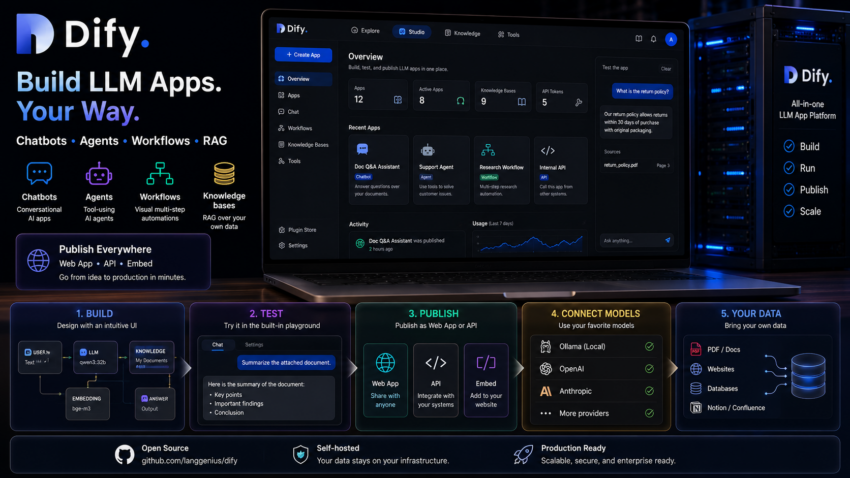
Short description
Dify is an all in one platform to build, run, and publish LLM apps. It covers chatbots, agents, visual workflows, and RAG knowledge bases, then lets you publish any of them as a web app or an API.
Purpose and how people use it
People use Dify to go from idea to a shippable LLM app fast. You can build a document question and answer assistant over your own files, an agent that uses tools, or a multi step workflow, then expose it through an API for other systems to call. It is one of the most complete local app platforms.
Prerequisites
- Docker and git installed.
- Ollama running.
Quick setup
cd ~
git clone https://github.com/langgenius/dify.git
cd dify/docker
cp .env.example .env
Set a strong secret key:
echo "SECRET_KEY=$(openssl rand -base64 42)" >> .envOpen .env and set EXPOSE_NGINX_PORT=8080. That is the host port you will visit in the browser. Then start the stack:
docker compose up -dOpen http://localhost:8080/install, create the admin account, and log in.
Connect your local models. In Dify 1.x, model providers are plugins, so first install the Ollama plugin from the Plugins area. Then open Settings, then Model Provider, choose Ollama, and add a model with base URL http://host.docker.internal:11434.
The two things that trip everyone up
- There are two nginx port settings.
NGINX_PORTis internal to the container network. The one you actually want for your browser isEXPOSE_NGINX_PORT. Change the wrong one and Dify comes up on a port you did not expect, often port 80. - When you add an Ollama model, set Model Type to LLM for chat models such as qwen3:32b. If you pick Text Embedding for a chat model you get a 501 error that says the model does not support embeddings. Use Text Embedding only for real embedding models such as bge-m3.