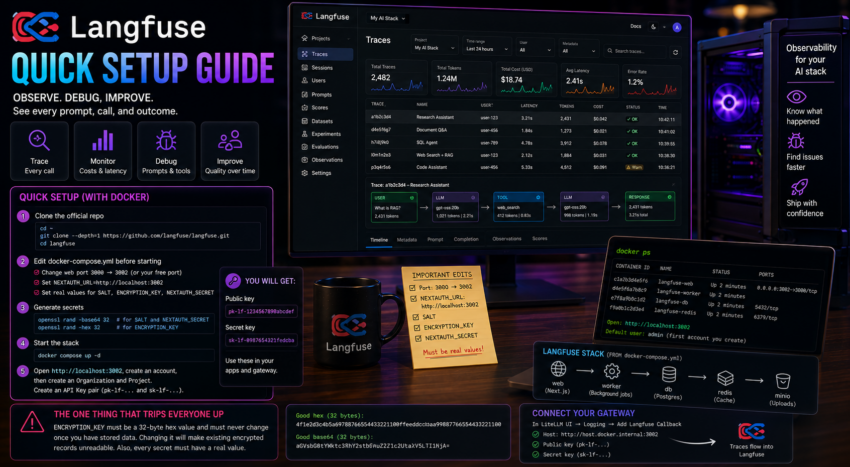
Short description
Langfuse is observability and tracing for LLM applications. It records every call, prompt, response, latency, and cost so you can see what your stack is actually doing.
Purpose and how people use it
People use Langfuse to debug and improve LLM apps. When an agent gives a strange answer, the trace shows the exact prompts, tool calls, and responses behind it. Teams use it to track cost, latency, and quality over time. It fills the gap that builders and gateways leave open, which is visibility.
Prerequisites
- Docker and git installed.
- A few minutes, since this is a multi container stack.
Quick setup
Clone the official repository and enter it.
cd ~
git clone --depth=1 https://github.com/langfuse/langfuse.git
cd langfuse
Open docker-compose.yml and make three edits before starting:
- Change the web service host port from 3000 to a free port. In this stack we use 3002, because Flowise already owns 3000.
- Set
NEXTAUTH_URLto match, for examplehttp://localhost:3002. - Provide real values for three secrets:
SALT,ENCRYPTION_KEY, andNEXTAUTH_SECRET.
Generate the secrets:
openssl rand -base64 32   # use for SALT and for NEXTAUTH_SECRET
openssl rand -hex 32      # use for ENCRYPTION_KEY
Start the stack:
docker compose up -dOpen http://localhost:3002, create an account, then create an organization and a project. Inside the project, open Settings, then API Keys, and create a key pair (a public pk-lf- key and a secret sk-lf- key).
Connecting your gateway
To capture every model call, add Langfuse as a callback inside LiteLLM. In the LiteLLM UI, open the logging section, add a Langfuse callback, paste the public and secret keys, and set the host to http://host.docker.internal:3002. A quick test request then appears as a trace in Langfuse.
The one thing that trips everyone up
The ENCRYPTION_KEY must be a 32 byte hex value and must never change once you have stored data, because existing encrypted records can no longer be read with a different key. Generate it once, then leave it alone. Also watch the compose file for malformed secret lines. Each secret needs a real value, not an empty placeholder.