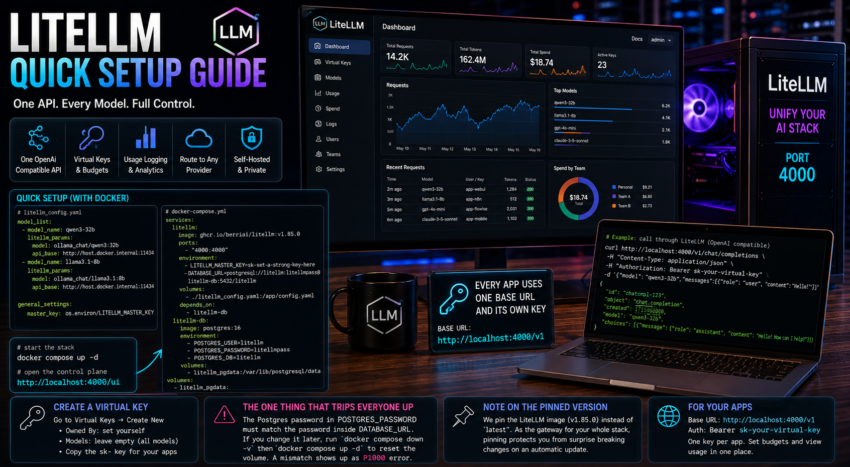
Short description
LiteLLM is a gateway that puts every model, local or cloud, behind one OpenAI compatible API. It adds virtual keys, usage logging, and a control plane UI.
Purpose and how people use it
People use LiteLLM to stop juggling different SDKs and keys for different providers. Every app points at LiteLLM, and LiteLLM routes the request to Ollama, OpenAI, Anthropic, or anything else. You issue a virtual key per app, set budgets, and get one place to see and log all traffic. It is the unifying layer of a serious stack.
Prerequisites
- Docker installed.
- Ollama running.
Quick setup
Create the folder, a config file, and a compose file with a bundled Postgres database.
mkdir -p ~/litellm && cd ~/litellm

cat > litellm_config.yaml << 'EOF'
model_list:
  - model_name: qwen3-32b
    litellm_params:
      model: ollama_chat/qwen3:32b
      api_base: http://host.docker.internal:11434
  - model_name: llama3.1-8b
    litellm_params:
      model: ollama_chat/llama3.1:8b
      api_base: http://host.docker.internal:11434

general_settings:
  master_key: os.environ/LITELLM_MASTER_KEY
EOF
cat > docker-compose.yml << 'EOF'
services:
litellm:
image: ghcr.io/berriai/litellm:v1.85.0
container_name: litellm
restart: unless-stopped
ports:
- "4000:4000"
environment:
- LITELLM_MASTER_KEY=sk-set-a-strong-key-here
- DATABASE_URL=postgresql://litellm:litellmpass@litellm-db:5432/litellm
- STORE_MODEL_IN_DB=True
- UI_USERNAME=admin
- UI_PASSWORD=set-a-password
volumes:
- ./litellm_config.yaml:/app/config.yaml
command: ["--config", "/app/config.yaml"]
depends_on:
- litellm-db
litellm-db:
image: postgres:16
container_name: litellm-db
restart: unless-stopped
environment:
- POSTGRES_USER=litellm
- POSTGRES_PASSWORD=litellmpass
- POSTGRES_DB=litellm
volumes:
- litellm_pgdata:/var/lib/postgresql/data
volumes:
litellm_pgdata:
EOF
docker compose up -dOpen the control plane at http://localhost:4000/ui and log in with the UI username and password.
Create a virtual key under Virtual Keys. Set Owned By to yourself, leave Models empty to allow all models, and save the sk- key for your apps.
The one thing that trips everyone up
The Postgres password in POSTGRES_PASSWORD must match the password inside DATABASE_URL. Postgres bakes the password on first init, so if you change it later you must run docker compose down -v then docker compose up -d to reset the database volume. A mismatch shows up as a P1000 authentication error.
Note on the pinned version
This guide pins a specific image version rather than latest. For a tool that sits in the middle of all your traffic, pinning protects you from a surprise breaking change on a random pull.