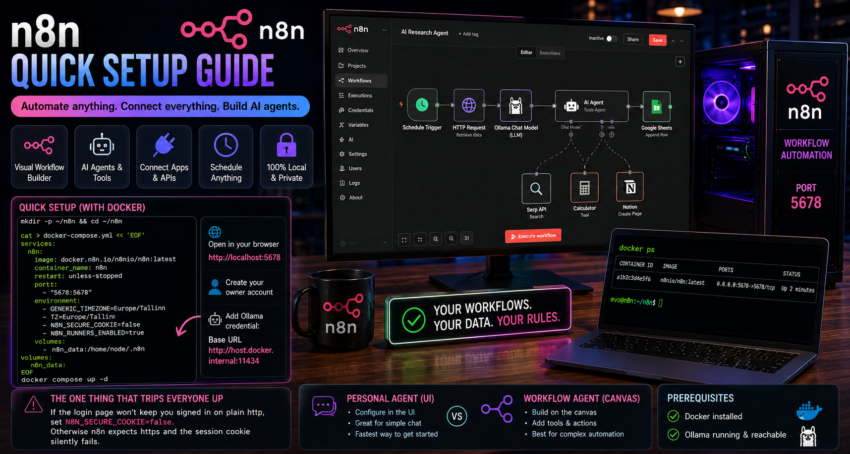
Short description
n8n is a workflow automation platform with strong AI building blocks. You wire nodes together on a canvas to automate tasks and build agents.
Purpose and how people use it
People use n8n to connect apps and APIs and to build AI agents and pipelines without writing much code. Typical uses include automated research, data enrichment, chatbots, scheduled jobs, and tool using agents that call your local models. It sits in the orchestration layer of the stack.
Prerequisites
- Docker installed.
- Ollama running for the AI nodes.
Quick setup
mkdir -p ~/n8n && cd ~/n8n

cat > docker-compose.yml << 'EOF'
services:
  n8n:
    image: docker.n8n.io/n8nio/n8n:latest
    container_name: n8n
    restart: unless-stopped
    ports:
      - "5678:5678"
    environment:
      - GENERIC_TIMEZONE=Europe/Tallinn
      - TZ=Europe/Tallinn
      - N8N_SECURE_COOKIE=false
      - N8N_RUNNERS_ENABLED=true
    volumes:
      - n8n_data:/home/node/.n8n

volumes:
  n8n_data:
EOF

docker compose up -d
Open http://localhost:5678 and create your owner account.
To use your local models, add an Ollama credential and set the base URL to http://host.docker.internal:11434. You can then use Ollama inside the AI Agent and Chat nodes.
The one thing that trips everyone up
If the login page refuses to keep you signed in on a plain http setup, the fix is the N8N_SECURE_COOKIE=false line shown above. Without it, n8n expects https and the session cookie silently fails when you run locally.
Personal agent versus workflow agent
n8n offers a lightweight chat agent you configure in the UI, and a full agent you build on the canvas with tools and actions. For simple chat, the UI configured personal agent is quickest. For anything that needs to call tools or external systems, build it on the canvas.