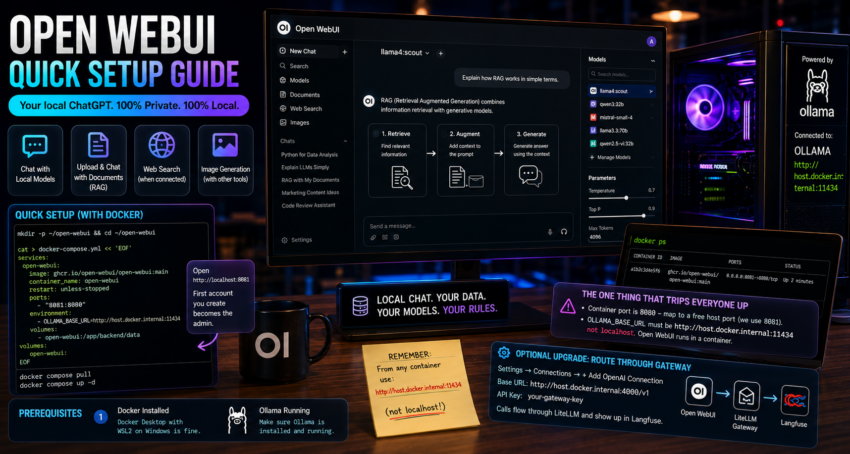
Short description
Open WebUI is a polished, locally hosted chat interface for your own models. It looks and feels like ChatGPT but runs entirely on your machine.
Purpose and how people use it
It is the front door to a local AI stack. People use it for everyday chat with local models, for document chat (RAG) by uploading files, for web search when paired with a search backend, and even for image generation when connected to an image tool. It is usually the first thing a non technical user actually touches.
Prerequisites
- Docker installed. Docker Desktop with WSL2 on Windows is fine.
- Ollama running and reachable. See the Ollama guide.
Quick setup
Create a folder and a compose file. The container listens on 8080 internally, so publish it on a free host port. Here we use 8081 to avoid clashing with other tools.
mkdir -p ~/open-webui && cd ~/open-webui

cat > docker-compose.yml << 'EOF'
services:
  open-webui:
    image: ghcr.io/open-webui/open-webui:main
    container_name: open-webui
    restart: unless-stopped
    ports:
      - "8081:8080"
    environment:
      - OLLAMA_BASE_URL=http://host.docker.internal:11434
    volumes:
      - open-webui:/app/backend/data

volumes:
  open-webui:
EOF
Pull and start:
docker compose pull
docker compose up -d
Open http://localhost:8081. The first account you create becomes the admin. Your Ollama models appear in the model dropdown automatically.
The one thing that trips everyone up
The container port is 8080, which collides with many other tools. Always map it to a free host port. And the OLLAMA_BASE_URL must use host.docker.internal, not localhost, because Open WebUI runs in a container.
Optional upgrade
To route chats through a gateway for logging, open Settings, then Connections, and add an OpenAI connection with base URL http://host.docker.internal:4000/v1 and your gateway key. Calls then flow through LiteLLM and show up in Langfuse.