Short description
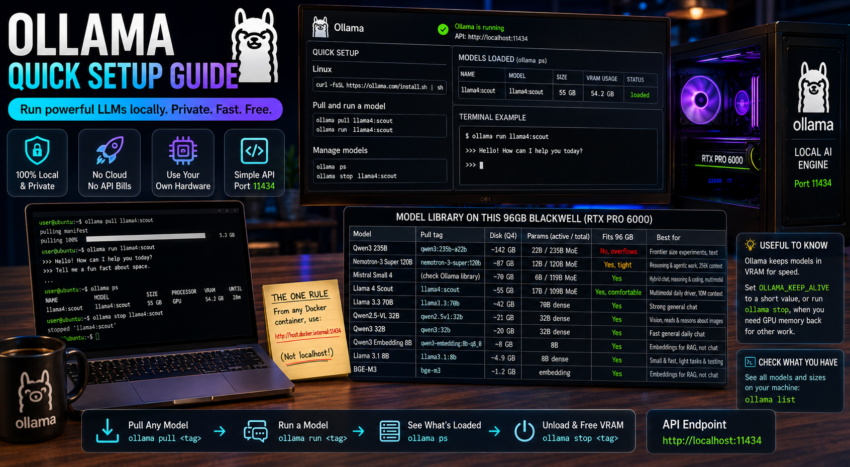
Ollama is a local model runner. It downloads open weight LLMs and serves them through a simple local API at port 11434.
Purpose and how people use it
Ollama is the engine layer of a local AI stack. People use it to run models like Llama, Mistral, Qwen, and Nemotron on their own hardware with no cloud and no API bills. Every other tool in this series (chat interfaces, builders, gateways) connects to Ollama to do the actual thinking. If a tool needs a model, it points at Ollama.
Prerequisites
- A machine with a recent NVIDIA GPU and current drivers for good speed. A CPU works but is slow.
- On Windows, install Ollama directly on the host. On Linux, install it on the host or in a container.
Quick setup
On Windows, download the installer from ollama.com and run it. Ollama installs as a background service and listens on http://localhost:11434.
On Linux:
curl -fsSL https://ollama.com/install.sh -o install-ollama.sh
sh install-ollama.sh
Pull a model and test it:
ollama pull llama4:scout
ollama run llama4:scout
Check what is loaded in VRAM, and unload when you are done:
ollama ps
ollama stop llama4:scout
The full model library on this 96GB Blackwell (RTX PRO 6000)
This is every model pulled on this machine, largest to smallest. For the mixture of experts models the Params column shows active out of total: only the active slice runs per token, which is why a very large model can still be fast and fit in memory. Pull any of them with ollama pull <tag>.
| Model | Pull tag | Disk (Q4) | Params (active / total) | Fits 96 GB | Best for |
|---|---|---|---|---|---|
| Qwen3 235B | qwen3:235b-a22b | ~142 GB | 22B / 235B MoE | No, overflows and spills to system RAM | Frontier size experiments, text |
| Nemotron-3 Super 120B | nemotron-3-super:120b | ~87 GB | 12B / 120B MoE | Yes, tight | Reasoning and agentic work, 256K context, text only |
| Mistral Small 4 | check Ollama library for tag | ~70 GB | 6B / 119B MoE | Yes | Hybrid chat, reasoning, and coding, multimodal |
| Llama 4 Scout | llama4:scout | ~55 GB | 17B / 109B MoE | Yes, comfortable | Multimodal daily driver, 10M token context |
| Llama 3.3 70B | llama3.3:70b | ~42 GB | 70B dense | Yes | Strong general chat |
| Qwen2.5-VL 32B | qwen2.5vl:32b | ~21 GB | 32B dense | Yes | Vision, reads and reasons about images |
| Qwen3 32B | qwen3:32b | ~20 GB | 32B dense | Yes | Fast general daily chat |
| Qwen3 Embedding 8B | qwen3-embedding:8b-q8_0 | ~8 GB | 8B | Yes | Embeddings for RAG, not chat |
| Llama 3.1 8B | llama3.1:8b | ~4.9 GB | 8B dense | Yes | Small and fast, light tasks and testing |
| BGE-M3 | bge-m3 | ~1.2 GB | embedding | Yes | Embeddings for RAG, not chat |
How to choose:
- For everyday chat with images and long context, use Llama 4 Scout.
- For the hardest reasoning and agent tasks, use Nemotron-3 Super, and free other VRAM first because it is tight.
- For one model that does chat, reasoning, and code together, use Mistral Small 4.
- For small and fast jobs or for load testing, use Llama 3.1 8B.
- For images, use Qwen2.5-VL.
- For RAG inside other tools, set the embedding model to BGE-M3 or Qwen3 Embedding. Embedding models cannot chat, and chat models cannot embed.
A note on VRAM math: a model needs roughly as much VRAM as its disk size. With 96 GB you can run one large model with headroom, but the 142 GB Qwen3 235B does not fully fit, so part of it runs in system RAM and it slows down. Use ollama ps to see what is resident and ollama stop to free space.
To confirm the exact set and sizes on your own machine at any time:
ollama listThe one thing that trips everyone up
Other tools run inside Docker containers, so localhost from inside a container does not reach Ollama on your host. From any container, use http://host.docker.internal:11434 as the Ollama base URL. This single rule fixes most “cannot connect to Ollama” problems.
Useful to know
Ollama keeps a model loaded in VRAM after use, which is great for speed but holds memory. Set the environment variable OLLAMA_KEEP_ALIVE to a short value, or run ollama stop, when you need the GPU back for other work such as image generation or gaming.